TikTok’s features for combining users’ videos lend themselves to political disputes. Quick et al, CC BY-NC-SA
Subscribe for Updates!
Join our mailing list to receive the latest news and updates from our team.
You have Successfully Subscribed!
Tiktok's statements about how it intends its Stitch, Green Screen and Duet features to be used and how people actually use them can be quite different.
The U.S. House of Representatives passed legislation on March 13, 2024, seeking to force TikTok’s China-based parent company to sell the app or face a ban in the U.S. Even if this legislation passes the Senate and Biden signs it into law, it’s unlikely TikTok will go away before the 2024 U.S. presidential election. Any law banning TikTok is likely to be challenged in court, and the app won’t simply disappear from people’s phones overnight.
Given that TikTok is almost certain to play a role in the 2024 election, it’s important to examine how TikTok helps shape political expression and discussion. With communications scholar Mackenzie Quick, I recently published a journal article exploring how American TikTok users use the app’s stitch, duet and green screen features to stoke partisan conflict.
Getting Together
TikTok says its mission is to “inspire creativity and bring joy.” In 2019, it introduced several features to help bolster that mission: duet, green screen and stitch. Duet allows you to post your video side by side with a video from another TikTok user. Green screen allows you to superimpose your video on a video from another TikTok user. Stitch allows you to append your video to the end of a short clip from a video from another TikTok user.
TikTok describes these features as giving users “the most creative tools available” and providing a way for users “to engage with the world of content that’s made … by the ever-creative TikTok community.” Given these descriptions, it appears that these tools were designed to increase creativity, interaction and connections.
They can be used in playful ways or used by subject matter experts to convey information. For example, some veterinarians use TikTok to convey pet health information.
However, a platform’s statements about how it intends its features to be used and how people actually use them can be quite different. While these features are often used in TikTok’s preferred ways, our research found that in political tiktoks, people often used the tools to double down on their political positions and attack those who don’t agree with them. In a time of volatile political divisiveness, these features can function as outlets for people to express their strongly held political views.
Scoring points
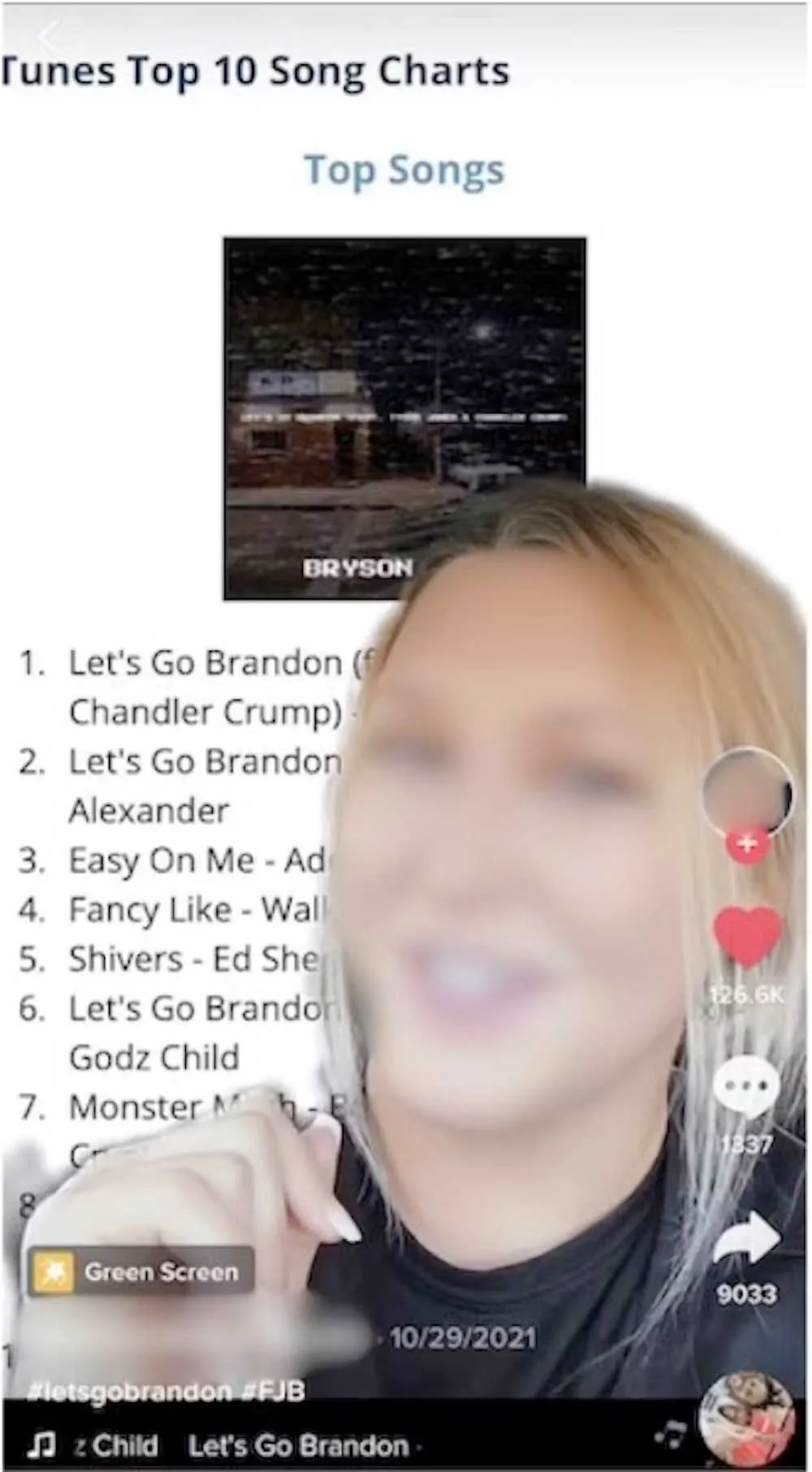
Reinforcement and insults were recurring themes in our study. For instance, the green screen feature was often used to incorporate “evidence” in the background to support the creator’s claims. With this feature, “evidence” was often presented in the form of news articles or posts from other social media platforms.
A TikTok user makes a political statement using the app’s green screen feature. Quick et al, CC BY-NC-SA
One post from a conservative-leaning creator features a screenshot of the Apple iTunes music store charts to show the popularity of a song called “Let’s Go Brandon,” a conservative rallying cry and coded insult against Biden. This creator presents the song’s position at No. 1 in the music store as proof that the conservative viewpoint is popular. “Evidence” is a loose term and could be anything that supported the creator’s viewpoint.
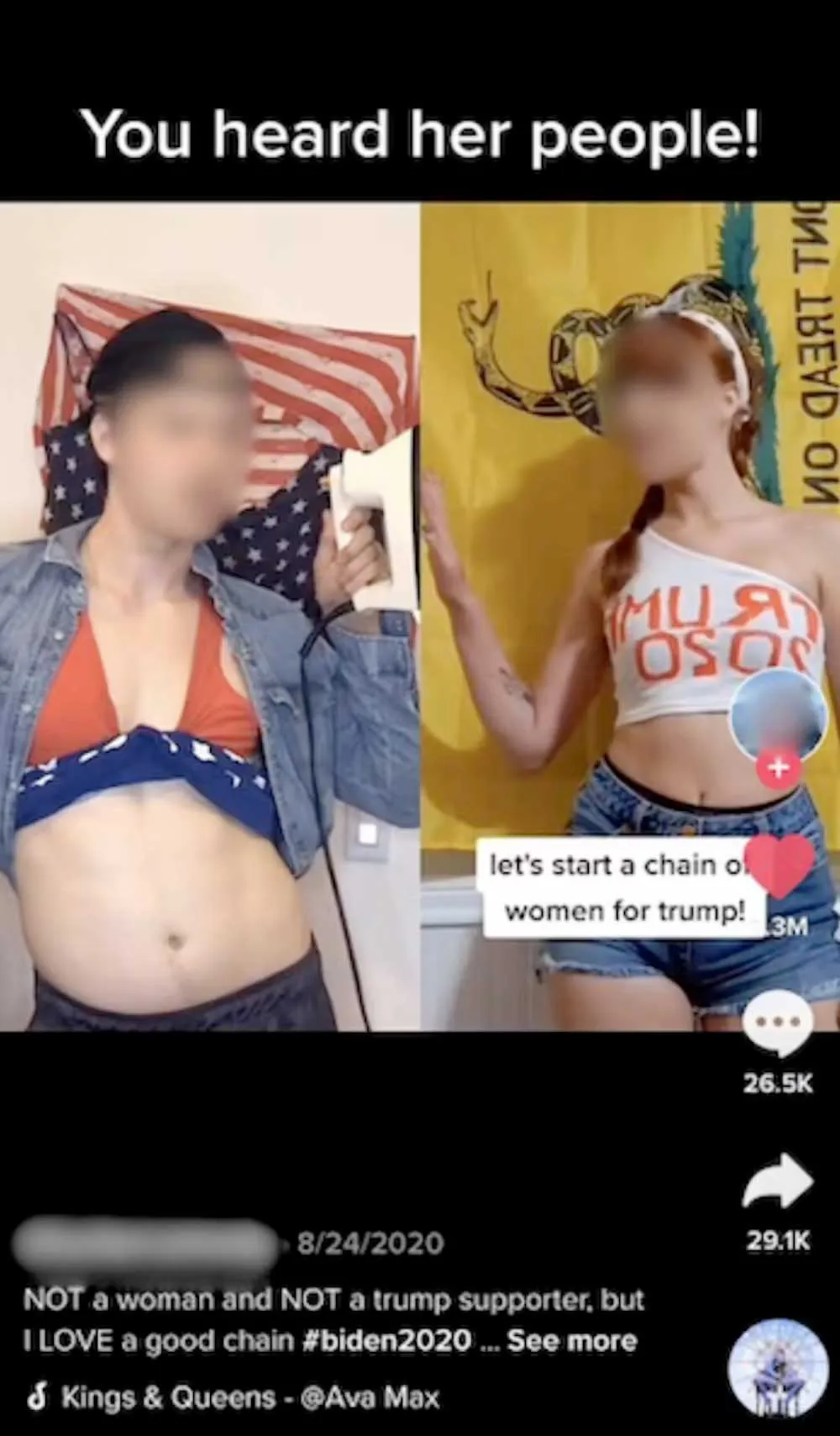
We found the duet feature was often used to communicate nonverbally, often to poke fun at someone with opposing political views. Eye rolling, smirking and head shaking were common gestures. In one video, a conservative creator starts a chain—an extended succession of duets—of women who support former President Donald Trump. A liberal-leaning creator uses the duet feature to join the chain with video of themselves holding a clothes iron out to the side to make it appear as though the iron is burning the original creator’s hand.
Stitches functioned similarly to duets, but people tended to use the feature as a chance to verbally respond and refute the previous creator’s point. These uses show that on political TikTok, personal feelings and proving others wrong matter more than constructive debate.
TikTok’s duet feature is often used to show support or opposition to a political statement. Quick et al, CC BY-NC-SA
The who and why of political TikTok
While regulation of the app is a political issue, understanding how political conversations occur across TikTok remains important for understanding an increasingly polarized American electorate. When considering political discussions on TikTok, however, it’s important to remember that the app’s features don’t force users to do anything. Users actively shape their experiences in digital spaces.
Also, as political communication scholars Daniel Kreiss and Shannon McGregor note, it’s important to proceed with caution when discussing the effects of technology on polarization because not all groups experience polarization the same way. For instance, the Black Lives Matter movement may be seen as polarizing for disrupting existing power structures, but its goal is to fight for equality, and it’s important to consider that context when looking at the group’s use of technology.
The lesson is to consider who is engaging in polarizing content and why they are doing so. While some users expressing themselves via these TikTok features aim to simply prove others wrong, akin to petty arguments, others may be critiquing and challenging the powerful.
The Conversation is a nonprofit, independent news organization dedicated to unlocking the knowledge of experts for the public good. We publish trustworthy and informative articles written by academic experts for the general public and edited by our team of journalists.
{"id":null,"mode":"form","open_style":"in_place","currency_code":"USD","currency_symbol":"$","currency_type":"decimal","blank_flag_url":"https:\/\/factkeepers.com\/wp-content\/plugins\/tip-jar-wp\/\/assets\/images\/flags\/blank.gif","flag_sprite_url":"https:\/\/factkeepers.com\/wp-content\/plugins\/tip-jar-wp\/\/assets\/images\/flags\/flags.png","default_amount":500,"top_media_type":"none","featured_image_url":false,"featured_embed":"","header_media":null,"file_download_attachment_data":null,"recurring_options_enabled":true,"recurring_options":{"never":{"selected":true,"after_output":"One time only"},"weekly":{"selected":false,"after_output":"Every week"},"monthly":{"selected":false,"after_output":"Every month"},"yearly":{"selected":false,"after_output":"Every year"}},"strings":{"current_user_email":"","current_user_name":"","link_text":"Leave a tip","complete_payment_button_error_text":"Check info and try again","payment_verb":"Pay","payment_request_label":"Factkeepers.com","form_has_an_error":"Please check and fix the errors above","general_server_error":"Something isn't working right at the moment. Please try again.","form_title":"Help Support Factkeepers","form_subtitle":null,"currency_search_text":"Country or Currency here","other_payment_option":"Other payment option","manage_payments_button_text":"Manage your payments","thank_you_message":"Thank you for being a supporter!","payment_confirmation_title":"Factkeepers.com","receipt_title":"Your Receipt","print_receipt":"Print Receipt","email_receipt":"Email Receipt","email_receipt_sending":"Sending receipt...","email_receipt_success":"Email receipt successfully sent","email_receipt_failed":"Email receipt failed to send. Please try again.","receipt_payee":"Paid to","receipt_statement_descriptor":"This will show up on your statement as","receipt_date":"Date","receipt_transaction_id":"Transaction ID","receipt_transaction_amount":"Amount","refund_payer":"Refund from","login":"Log in to manage your payments","manage_payments":"Manage Payments","transactions_title":"Your Transactions","transaction_title":"Transaction Receipt","transaction_period":"Plan Period","arrangements_title":"Your Plans","arrangement_title":"Manage Plan","arrangement_details":"Plan Details","arrangement_id_title":"Plan ID","arrangement_payment_method_title":"Payment Method","arrangement_amount_title":"Plan Amount","arrangement_renewal_title":"Next renewal date","arrangement_action_cancel":"Cancel Plan","arrangement_action_cant_cancel":"Cancelling is currently not available.","arrangement_action_cancel_double":"Are you sure you'd like to cancel?","arrangement_cancelling":"Cancelling Plan...","arrangement_cancelled":"Plan Cancelled","arrangement_failed_to_cancel":"Failed to cancel plan","back_to_plans":"\u2190 Back to Plans","update_payment_method_verb":"Update","sca_auth_description":"Your have a pending renewal payment which requires authorization.","sca_auth_verb":"Authorize renewal payment","sca_authing_verb":"Authorizing payment","sca_authed_verb":"Payment successfully authorized!","sca_auth_failed":"Unable to authorize! Please try again.","login_button_text":"Log in","login_form_has_an_error":"Please check and fix the errors above","uppercase_search":"Search","lowercase_search":"search","uppercase_page":"Page","lowercase_page":"page","uppercase_items":"Items","lowercase_items":"items","uppercase_per":"Per","lowercase_per":"per","uppercase_of":"Of","lowercase_of":"of","back":"Back to plans","zip_code_placeholder":"Zip\/Postal Code","download_file_button_text":"Download File","input_field_instructions":{"tip_amount":{"placeholder_text":"How much would you like to donate? You can change this amount to anything you would like.","initial":{"instruction_type":"normal","instruction_message":"How much would you like to donate? You can change this amount to anything you would like."},"empty":{"instruction_type":"error","instruction_message":"How much would you like to donate? You can change this amount to anything you would like."},"invalid_curency":{"instruction_type":"error","instruction_message":"How much would you like to donate? You can change this amount to anything you would like."}},"recurring":{"placeholder_text":"Recurring","initial":{"instruction_type":"normal","instruction_message":"How often would you like to donate this?"},"success":{"instruction_type":"success","instruction_message":"How often would you like to donate this?"},"empty":{"instruction_type":"error","instruction_message":"How often would you like to donate this?"}},"name":{"placeholder_text":"Name on Credit Card","initial":{"instruction_type":"normal","instruction_message":"Enter the name on your card."},"success":{"instruction_type":"success","instruction_message":"Enter the name on your card."},"empty":{"instruction_type":"error","instruction_message":"Please enter the name on your card."}},"privacy_policy":{"terms_title":"Terms and conditions","terms_body":null,"terms_show_text":"View Terms","terms_hide_text":"Hide Terms","initial":{"instruction_type":"normal","instruction_message":"I agree to the terms."},"unchecked":{"instruction_type":"error","instruction_message":"Please agree to the terms."},"checked":{"instruction_type":"success","instruction_message":"I agree to the terms."}},"email":{"placeholder_text":"Your email address","initial":{"instruction_type":"normal","instruction_message":"Enter your email address"},"success":{"instruction_type":"success","instruction_message":"Enter your email address"},"blank":{"instruction_type":"error","instruction_message":"Enter your email address"},"not_an_email_address":{"instruction_type":"error","instruction_message":"Make sure you have entered a valid email address"}},"note_with_tip":{"placeholder_text":"Your note here...","initial":{"instruction_type":"normal","instruction_message":"Attach a note to your tip (optional)"},"empty":{"instruction_type":"normal","instruction_message":"Attach a note to your tip (optional)"},"not_empty_initial":{"instruction_type":"normal","instruction_message":"Attach a note to your tip (optional)"},"saving":{"instruction_type":"normal","instruction_message":"Saving note..."},"success":{"instruction_type":"success","instruction_message":"Note successfully saved!"},"error":{"instruction_type":"error","instruction_message":"Unable to save note note at this time. Please try again."}},"email_for_login_code":{"placeholder_text":"Your email address","initial":{"instruction_type":"normal","instruction_message":"Enter your email to log in."},"success":{"instruction_type":"success","instruction_message":"Enter your email to log in."},"blank":{"instruction_type":"error","instruction_message":"Enter your email to log in."},"empty":{"instruction_type":"error","instruction_message":"Enter your email to log in."}},"login_code":{"initial":{"instruction_type":"normal","instruction_message":"Check your email and enter the login code."},"success":{"instruction_type":"success","instruction_message":"Check your email and enter the login code."},"blank":{"instruction_type":"error","instruction_message":"Check your email and enter the login code."},"empty":{"instruction_type":"error","instruction_message":"Check your email and enter the login code."}},"stripe_all_in_one":{"initial":{"instruction_type":"normal","instruction_message":"Enter your credit card details here."},"empty":{"instruction_type":"error","instruction_message":"Enter your credit card details here."},"success":{"instruction_type":"normal","instruction_message":"Enter your credit card details here."},"invalid_number":{"instruction_type":"error","instruction_message":"The card number is not a valid credit card number."},"invalid_expiry_month":{"instruction_type":"error","instruction_message":"The card's expiration month is invalid."},"invalid_expiry_year":{"instruction_type":"error","instruction_message":"The card's expiration year is invalid."},"invalid_cvc":{"instruction_type":"error","instruction_message":"The card's security code is invalid."},"incorrect_number":{"instruction_type":"error","instruction_message":"The card number is incorrect."},"incomplete_number":{"instruction_type":"error","instruction_message":"The card number is incomplete."},"incomplete_cvc":{"instruction_type":"error","instruction_message":"The card's security code is incomplete."},"incomplete_expiry":{"instruction_type":"error","instruction_message":"The card's expiration date is incomplete."},"incomplete_zip":{"instruction_type":"error","instruction_message":"The card's zip code is incomplete."},"expired_card":{"instruction_type":"error","instruction_message":"The card has expired."},"incorrect_cvc":{"instruction_type":"error","instruction_message":"The card's security code is incorrect."},"incorrect_zip":{"instruction_type":"error","instruction_message":"The card's zip code failed validation."},"invalid_expiry_year_past":{"instruction_type":"error","instruction_message":"The card's expiration year is in the past"},"card_declined":{"instruction_type":"error","instruction_message":"The card was declined."},"missing":{"instruction_type":"error","instruction_message":"There is no card on a customer that is being charged."},"processing_error":{"instruction_type":"error","instruction_message":"An error occurred while processing the card."},"invalid_request_error":{"instruction_type":"error","instruction_message":"Unable to process this payment, please try again or use alternative method."},"invalid_sofort_country":{"instruction_type":"error","instruction_message":"The billing country is not accepted by SOFORT. Please try another country."}}}},"fetched_oembed_html":false}